
A town hall for every project you’re building.
DevTownhall is a Mac app for developers with many projects. It reads each project’s own files (its status, tasks, Git, GitHub, and Claude Code history) and shows you where everything stands. There’s nothing to fill in.
$39, paid once. For macOS 14+ on Apple silicon and Intel.
lantern/DEVTOWNHALL.md
LanternActive
Invoicing for freelancers: send invoices, get paid by card.
- 7 of 13 tasks done
- 46 commits this week
- 5 Claude sessions
Claude writes the file. DevTownhall reads it.
Each project gets one small Markdown file, DEVTOWNHALL.md, that says where it stands. It’s the only task list: the app doesn’t keep a second one.
Set it up once with Claude
On a new project, Set Up with Claude asks Claude Code to write DEVTOWNHALL.md from your README, TODOs, Git history, and code.
Claude keeps it current
As you work, Claude moves tasks to Now, Done, or Blocked and bumps the version when you release. It's plain Markdown, so it reads well on GitHub too.
DevTownhall shows where it all stands
Status, progress, the next task, and what's blocked, for every project at once. Move a card on the Board and the file changes with it.
Take a look around
Every project on one page, the ones that need you first. Smart Schedule asks Claude what to work on today and this week.
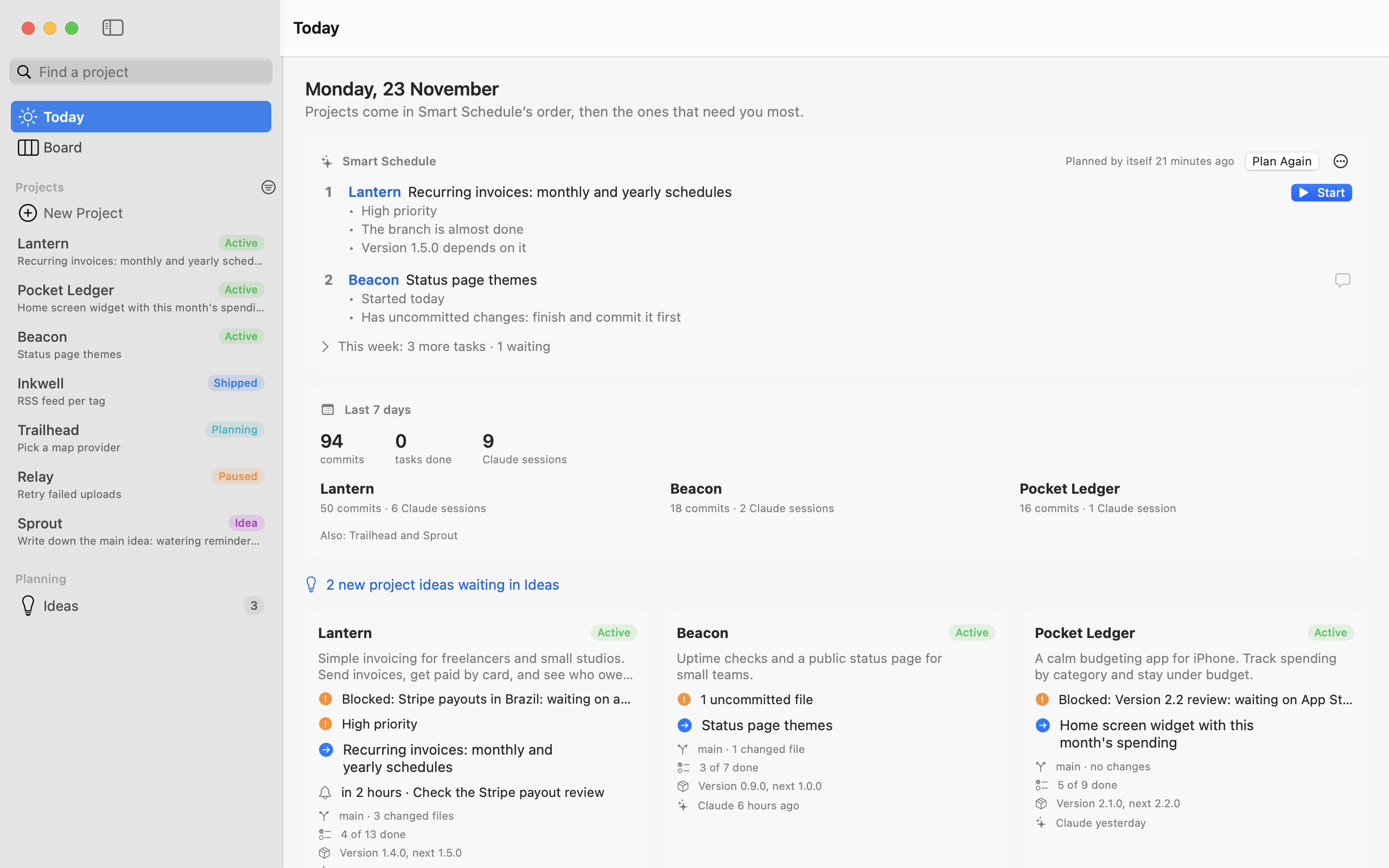
The projects in these pictures are made up.
Made for working with Claude Code
If you build with Claude Code across many projects, DevTownhall is where those projects meet. It uses the Claude Code already on your Mac, signed in as you.
A terminal in every project
Tabs of your own shell, opened in the project folder. Start Claude or resume a session with one click.
Your sessions, by project
Every Claude Code chat started in a folder, readable as a conversation, with the commands Claude ran.
A status file Claude maintains
Claude writes and updates DEVTOWNHALL.md, so your task list is never a second job.
Diagrams that stay true
Claude keeps sequence diagrams in ARCHITECTURE.md up to date, and the Diagrams tab draws them.
Review with Claude
Open pull requests and their reviewers on the GitHub tab, and start a review in the terminal.
Ask what to do tomorrow
Claude looks at all your projects and picks three tasks you can actually work on, and says what's waiting.
Your projects on your iPhone
DevTownhall for iPhone is a free companion to the Mac app. See where every project stands, and keep Claude Code working on your Mac while you’re away from it.
- Today, the Board, and every project’s page: status, tasks, Git, GitHub, and the last 7 days.
- A Now widget for your home screen and lock screen, for one project or all of them.
- Start Claude Code on your Mac, resume a recent session, or send Claude a message, and see when it’s ready or needs you.
- A notification when a Claude on your Mac asks you something or finishes while you’re away from it.
- Off until you turn on Settings › iPhone on your Mac. It goes through your own iCloud, end-to-end encrypted.
Free, for iOS 17+. Needs DevTownhall on your Mac, with the same Apple Account. Try it first with sample projects.
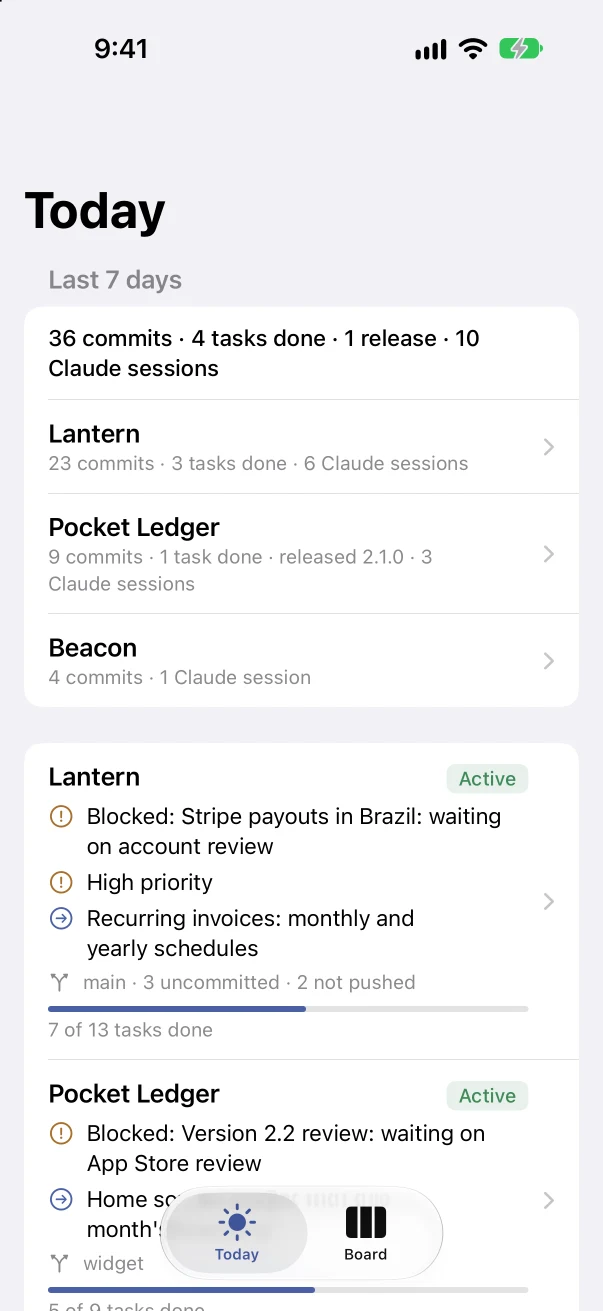
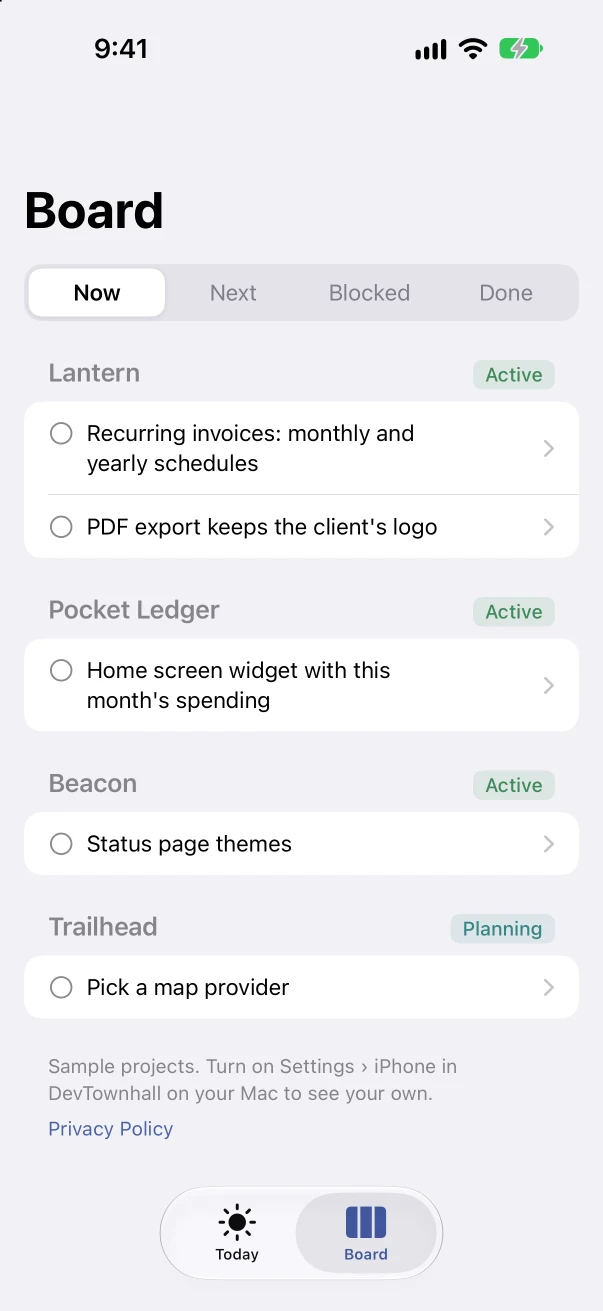
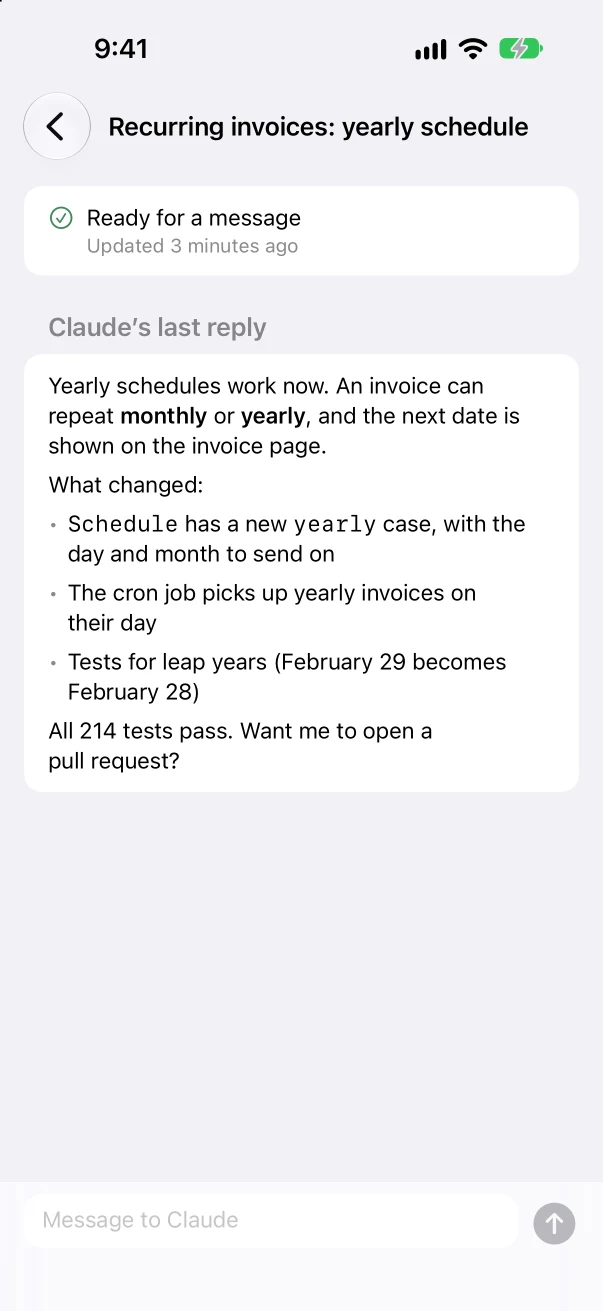
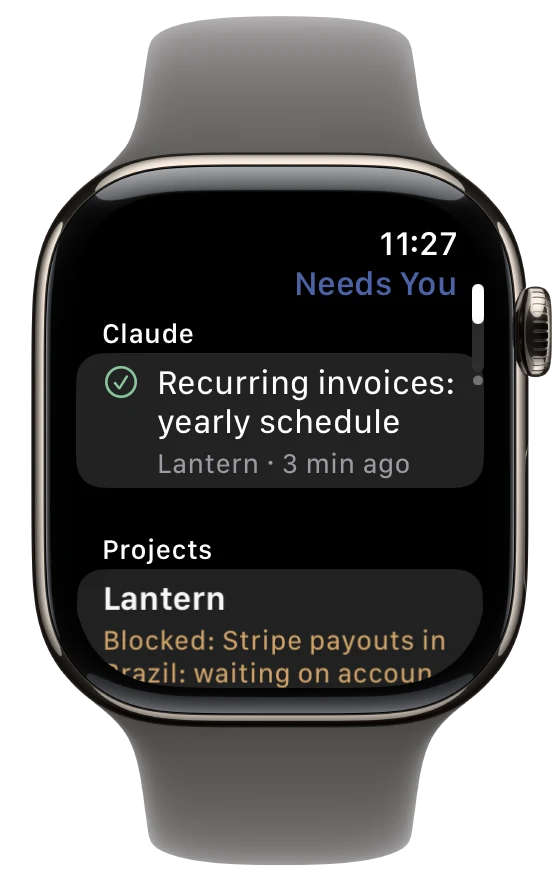
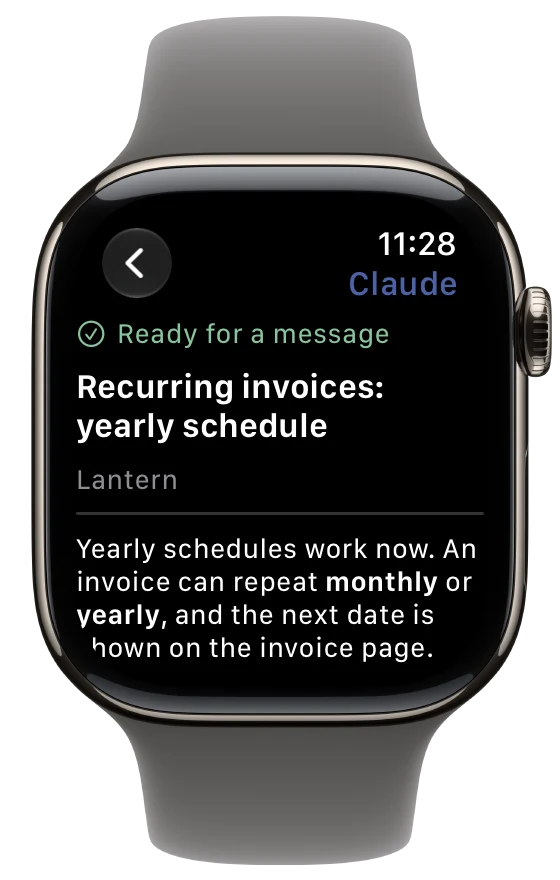
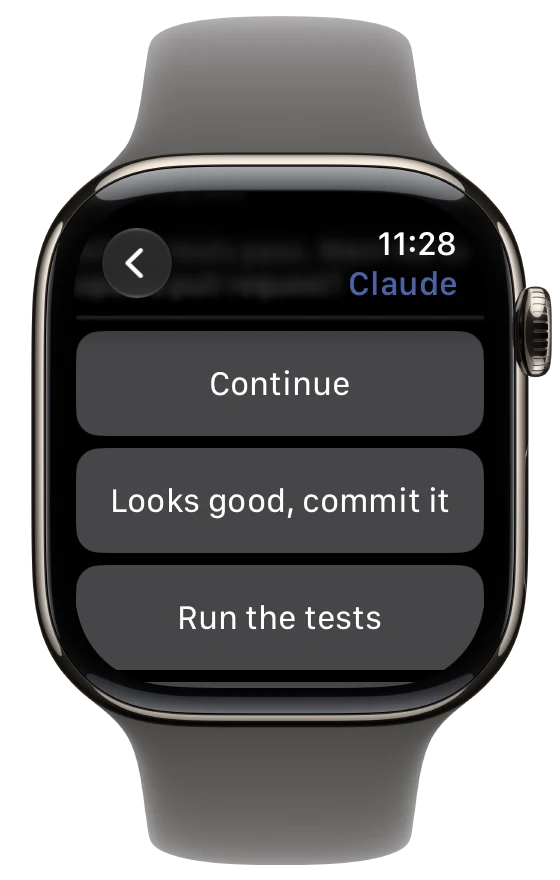
Claude on your wrist
The Apple Watch app shows which Claude needs you and what’s next, so you can answer Claude without reaching for your Mac.
- Needs You, your Claudes, and your Now tasks, one turn of the Digital Crown apart.
- Complications for your watch face and the Smart Stack.
- Reply to Claude with a tap or your voice, add a task, or start Claude about a task.
- Comes free with the iPhone app. Try it first with sample projects.
Free, for watchOS 10+. Needs the iPhone app, and DevTownhall on your Mac. Claude alerts need DevTownhall 0.6 or later.
It stays on your Mac
- Your projects stay on your Mac, unless you send them to your iPhone and Apple Watch through your own iCloud, end-to-end encrypted. No account, no analytics, no tracking.
- Project folders are read-only. The only file it changes is DEVTOWNHALL.md, and only when you move a task or change a status.
- Git runs on your Mac in read-only mode. GitHub sign-in is optional and read-only.
- Your code is never copied or uploaded.
$39
Paid once. No subscription.
- One license for one of your Macs. For macOS 14+ on Apple silicon and Intel.
- Updates install from inside the app.
- Full refund within 30 days, for any reason. Refund Policy
- Payment by Dodo Payments. Your key arrives by email a minute later.
Can’t pay $39 right now? Ask for a free key. We read every request, and a free license works just like a bought one.
Lost your key, or a Mac? Get help with your license. Questions? Email hello@devtownhall.com.
Release notes
What’s new in each version. DevTownhall checks for updates by itself, or choose DevTownhall › Check for Updates…
- Codex on your iPhone and Apple Watch (with DevTownhall for iPhone 1.6): each chat shows whether it's Claude or Codex, and Start says which one your Mac will start.
- Privacy: alerts go to your iPhone only when it asked for them, removing your license also removes this Mac's random ID, and activating a license no longer sends the app or macOS version. The privacy policy now covers every detail of what DevTownhall reads and sends.
- Pasted images older than a week are now also cleaned up when DevTownhall opens.
- Codex CLI support: choose Claude Code or Codex CLI in Settings › General › Coding agent. Start Chat starts your choice, and its arrow has both. The terminal tab shows whether Codex is working, ready, or needs you, also on your iPhone.
- Chats tab (was the Claude tab): your Claude Code and Codex chats in one place, with Resume.
- Cleaner chats: each reply shows just its answer, with the steps and commands folded under Show work. More space between lines and paragraphs makes long replies easier to read.
- Claude limits: see how much of your Claude plan you've used, on Today and in the menu bar. It updates every few minutes and uses no tokens.
- Add projects from Claude Code: DevTownhall finds the folders you've used Claude Code in, so you can add them in one click from the Welcome page or File › Add Projects from Claude Code.
- Voice input in the terminal: click the microphone, speak, and click Type. Speech is turned into text on your Mac only.
Earlier versions
- New terminal look: a font built into the app with the icons prompt themes use, so they show on every Mac with nothing to install, and soft colors for light and dark mode. Choose DevTownhall or System in Settings › General.
- GitHub tab: each commit shows a list of changed files. Click a file to see only its changes.
- The GitHub tab fits next to the terminal: in a narrow window the details go under the commit list.
- Long lines wrap in the Code tab and in the GitHub tab, so you don't scroll to the right. A button turns it off.
- Smart Schedule on Today: your Claude Code picks up to three tasks for today and more for this week, each with a short reason. Start one with a click, or let it plan by itself each morning.
- Scheduled tab on the Board: each task runs Claude in its own terminal, up to three at a time and one per project. When Claude checks a task off, the next one starts.
- Reminders, for you or for Claude: add them on a project's Dashboard or on your iPhone. They ring on your Mac, iPhone, and Apple Watch, even while your Mac sleeps. A reminder for Claude has Send to Claude.
- One project for an app in several repositories: pick the folder that holds them, and DevTownhall finds each one. Claude works across all of them, and the GitHub tab shows every repository. A part in another place can be added with Add Folder.
- New Settings window, where you can hide any project tab. Commits moved into the GitHub tab.
- The terminal uses your Nerd Font when one is installed, so the icons of prompt themes such as Starship and Powerlevel10k show.
- Claude tab: see which chats are running now and open their terminal. Search chats, find text inside a chat (⌘F), copy a chat as Markdown, and see the names you gave with /rename.
- Delete a chat: it goes to the Trash, and Put Back brings it back.
- Code tab: edit and save files. If Claude changed a file while you were editing it, DevTownhall asks before saving.
- Previews in the Code tab: pictures, GIFs, Markdown, SVG, Mermaid, and more.
- Safer terminal: program output can't change your clipboard, and ⌘-click opens only web links.
- Many smaller fixes.
- The lock screen shows the current price. Nothing else changes, and your license keeps working.
- Claude alerts: when Claude asks you something or finishes while you're away from your Mac, DevTownhall for iPhone 1.3 can notify you. Turn it on on a project's page on your iPhone.
- Ready for DevTownhall on Apple Watch (with iPhone 1.3): see which Claude needs you, reply, and add a task from your wrist.
- Chat button on each task: on the Board and the Plan card, it starts Claude with that task.
- From your iPhone (DevTownhall for iPhone 1.2): add a task to Next, or tap the chat button next to a task to start Claude with it on your Mac. Tasks from the iPhone now arrive within a minute.
- Only on This Mac: for a client's repository, Set Up Only on This Mac keeps DEVTOWNHALL.md out of Git, so nothing in the repository changes.
- A license key now activates on one Mac.
- DevTownhall for iPhone: turn on Settings › iPhone to see your projects, Board, and widgets on your iPhone, through your own private iCloud, end-to-end encrypted.
- Claude from your iPhone: turn on Allow commands from iPhone to start Claude Code, resume a recent session, or send Claude a message from your phone. It runs in a terminal tab on your Mac.
- Each terminal shows whether Claude is working, ready, or needs you.
- The menu bar icon is now the DevTownhall logo.
- Settings › Pages: choose which projects Today lists, which lines its cards show, and which Dashboard cards show. Right-click a Dashboard card to hide it.
- Today in the menu bar: see the projects that need you without opening the window.
- Last 7 days on Today: commits, tasks finished, releases, and Claude sessions across your projects.
- The Dashboard reads only what its shown cards need.
- Fixed: Git status could stop loading when many projects were read at once.
- The first public release.
- Every project in one place: Dashboard, Code, Commits, Claude, GitHub, Diagrams, and Database tabs.
- Board and Today pages, driven by each project's DEVTOWNHALL.md.
- Terminals in tabs, with Claude Code built in.
- A license key unlocks the app on up to 2 of your Macs.